2016年8月24日星期三

DVDFab Back to School 2016 – Students and Faculties Get 30 percent Discount


Storewide 30 percent Discount Offered to All the Students and Faculties:
Every year around this time, the summer break shall soon come to the end, and all the students and teachers are busy preparing for the new term ahead. To live up to this theme, it is the practice of many stores to provide special deals exclusively to those who are waving goodbye to their families and getting back to schools, and DVDFab is no different. This time, the multimedia solution vendor offers a stunning storewide 30 percent discount on all of its products, covering the DVD & Blu-ray copy software, ripper software, converter software and authoring software, the DVD & Blu-ray decrypting software, the media player software and the data care software.
All that asked is a simple picture indicating the buyer’s identity as a student or a school faculty member, an image of a Student ID Card, a Teacher Certificate, or even a picture with students and teachers in class shall do the trick. After uploading that image, the purchaser shall be redirected to special page where the 30 percent discount can be used. Bear in mind, the Back to School Deal lasts before Sept. 6, 2016 — don’t watch it slip through your fingers.
25 percent off Coupon All the General Customers:
Although the main theme of this deal is about the students and faculties returning for new school term, those who are neither students nor teachers are not left behind. During the Back to School promotion time, all the average customers are offered the great convenience to buy any wanted DVDFab single product or bundled package with 25 percent off, including the bestseller of all time, DVDFab All-In-One Lifetime Package which covers almost all the paid products, with the exception to the Passkey software,media player software and the data care series.
For accuracy’s sake, that versatile lifetime combo consists of the lifetime versions of DVD Copy, DVD Ripper, Blu-ray Copy, Blu-ray Ripper, Blu-ray to DVD Converter, DVD to Blu-ray Converter, DVD Creator, CinaviaRemoval HD, Blu-ray Creator, Video Converter, and File Transfer, along with a $20 dollar Amazon Gift Card as the free gift. If you are interested, head for the special deal as soon as you can before the 25 percent off offer closes at the end of Sept. 5.
About Fengtao Software:
Fengtao Software Inc., a professional multimedia software provider, has been dedicated to working on DVD cloner, DVD copy, Blu-ray copy, DVD ripper, DVD/Blu-ray conversion, video converter, DVD creator, Blu-ray creator, Blu-ray media player, etc. for more than 11 years with its well-known DVDFab software. It has more than 50 million global users. More information at: http://www.dvdfab.cn.

VIDEO (YouTube): https://youtu.be/bdPgbnekSCY


2016年7月26日星期二

DVDFab Video Converter With 3D Video Conversion For Windows 10 Review

Video Converter from DVDFab is one of the most powerful and fast software forWindows 10 PC and laptop for video conversion you can ever get on the market for all your money you invest. By The Most powerful we mean that it is one of the best that you can get and this piece of software will live up to the fullest of your expectations.
DVDFab is well known for its roots into the video converting software department as well as media players and comes with an experienced (12 years )parent company.
The Software can read almost all Video formats which are more or less popular among the Internet uploaders, Cam Corders as well as gameplay capture cards which record varied stuff according to the need. All these types of video sources can be converted to your desired video or audio format as per your wish on your personal computer.
The converted videos will be supported by many multimedia devices and players including most famous VLC player and all your Portable devices including mobile phones, tablets as well as iPod Touches etc.

Features of DVDFAB Video Converter For Windows 10

DVD Fab offers multiple Professional editing settings so that you can customize your videoto the fullest before converting it to your desired format of choice.
1. Wide Range of Video Types
DVD Fab has been seeing recent updates allowing user to manipulate and convert videos in the newest H.265 and 4k video Formats so as to get all over decent video quality along with smooth playback.
DVD Fab will also allow you to convert HD Videos Of all formats. For instance DVD fab will let you convert a video of AVI format to any other format you wish such as MKV.
2. 3D Video Conversion Support

This software will let you convert your 2D and 3D videos Too with just a few clicks and making your job a lot more easier as earlier converters for 3D videos were very scarce and if they were present they just asked extra money to be able to convert a single 3D Video ( For Ex. – FxVideo editor demanded you to pay 15$ for each 3D video converted).
3. Support To varied genre’s of Devices and Media Players

The video that you wish to convert can be played on a severely wide range of multimedia devices including many media players too.
All videos converted can give playback on iPod, iPhone 6, iPad (The New iPad), PSP, ZUNE, NDS, Xbox 360, Apple TV, PS3, Cell Phone, PVP, PDA, etc.
Besides all these varied devices video playback can also be given on devices other than these and can be added manually to the software.
4. DVD Ripping as well as writing: Trail Only
If you ever wished to have all your dvd Movies or even blu ray movies for the matter of fact, then DVD Fab is just your partner as this software will allow you to copy all the data from your Movie Dvd and store a soft copy of it in your Personal Computer as per your wish.
This can later on be Written back on an empty DVD of the same size as the file of the DVD iso which usually is of 4.7 giga bytes but sometimes it can also be above 8 giga bytes if there are 2 or more movies in a single DVD in order to avoid Decompression real quick and not compromising of the video quality. You can also use this software for sharing the saved soft copy of your favorite movie.
Blu ray Movies can also be ripped quite easily and have a far-far better quality than that of DVD movies.
5. Support To Varied DVD and Blu-Ray types:Trail Only
DVD Fab provides support to all kinds of DVD’s and Blu Ray’s you can get on the market for your use. DVD formats include DVD+R/RW, DVD-R/RW, DVD+R DL, and DVD-R DL and Blu-Ray format Includes BD+R/RW only.
Also it comes with various settings to personalize your DVD and make it your own.
Settings available
Other notable features
Trim, Crop, Watermark, Invert, Subtitle
  • Task queue option
  • Merge clips
  • Adjust aspect ratio
  • Rotate
  • Adjust : Brightness, Contrast, Saturation

Pros And Cons of this Windows 10 software

Pros
• Support for all kinds of video files and formats including 3GP File ( *.3gp; *3g2 ), ASF File ( *.asf ), AVI File ( *.avi; *.divx ), FLV File ( *.flv ), M2TS File ( *.m2ts ), MOV File ( *.mov ), MP4 File ( *.mp4; *.m4v ), MPEG File ( *.mpeg; *.mpg; *.dat ), MKV File ( *.mkv ), RMVB File ( *.rmvb; *.rm ), TS File ( *.ts ), VOB File ( *.vob ), WMV File ( *.wmv )
• Can convert audio files to for the name sake of being a video converter at the same time.
• Supports all types of Video playback devices.
• Quick conversion speeds for optimized and next gen hardware.
• Has minimal system requirements for a DVD video converter.
Cons
• Though this video converter includes many video formats it does omit some of them like the ones with DRM.
• Load on Notebook is kind of heavy because of limited RAM and other features.
• Conversion speeds are really slow if you have low core processors and slow and old GPU’s Like the GT 610 by nvidia.
• Requires an internet connection in the startup to check if you are registered user or not.
Final Thought
At the end of this article we come to the conclusion that this software from DVDFab is a bang for the buck and provides overall quite good of a performance and is a must buy if you are into video conversion on a Windows 10 PC/Laptop on a regular basis. Thought of trying it instead of buying the full version, no problem there is a free build that you can test drive.


2016年7月11日星期一

The Special Factors about DVDFab

The computer is well enough to access internet and other applications but users should need enough space to download and store the files like movies and applications. The backup is very essential to keep the secret and important files. The users have to buy original DVD to easily store the efficient files. However software is highly important to easily copy and burn DVD to other disc so users should download exclusive DVD copy software . The DVDFab is one of the popular software to easily copy the files into DVD. This software is highly powerful and even flexible so uses love to purchase DVDFab. The users no need to wait for longer time to copy files from hard disk and other media server. The DVDFab software is now available in online so users can simply purchase it. Today more than 45 million people are using DVDFab software to clone, burn, copy and other DVD backup.
The Important Details about DVDFab software    
Generally everyone wants to access faster computer so they need effective additional space in a computer to avoid working speed problems. The backup is also highly necessary when users want to do OS installation and format the hard disk. They must have additional tool support to avoid backup issues. The DVDFab is best software to make a DVD backup so they can simply avoid more problems by using DVDFab. 
  • The DVDFab is simply used to DVD backup, burn, copy and clone with few mouse clicks
  • The users can simply copy DVD-5 to DVD-5, DVD-9 to DVD-9, copy DVD-5 to DVD-9
  • There are 6 effective copy modes are now available such as full disc, split, customize, main movie, merge, burn and clone
  • They can easily copy the files into DVD with simple steps
  • The user friendly interface is also a key factor of DVDFab software that is helps to different purposes like copy  
However these important factors are highly attracts more users to purchase DVDFab software. They can easily copy and burn any format files because DVDFab is very convenient to use. They can simply personalize the DVD backup because of easy settings. The important files need to be safe so users have to do something like backups to avoid more risks from unexpected factors.
The Common System Requirements of Using DVDFab 
The software is simply used to save more time from various system works so users always love to install exclusive software. The DVDFab software is mainly used to copy files into DVD. The computer should be eligible to download DVDFab software so users should verify the important requirements. The windows 7, 8, 10, vista, and other windows xp are also support for accessing DVDFab software.  The system at least have 512 MB RAM to easily access this DVDFab system. The 20 GB hard disk space is highly effective to utilize this software. The internet connection is also very important to access some products of DVDFab. However DVDFab is pretty useful and more reliable so users don't worry about purchasing this software.

2016年4月7日星期四

How to Use the Storyline Preview Feature in DVDFab Media Player

Got a video but have no idea if it worth you 90 minutes to watch? No problem with DVDFsab Media Player. It lets you preview the storyline before eventually sitting down and watch a movie. For more information, just visit www.dvdfab.cn/mac-blu-ray-player.htm

How to Use the Quick Seek Feature in DVDFab Media Player

The latest version of DVDFab Media Player lets you quickly seek to the point you want to find. For more information, please go to www.dvdfab.cn/mac-blu-ray-player.htm

2016年4月6日星期三

How to Remove Protections on DVD/Blu-ray with DVDFab Passkey

For many elder movie enthusiasts who live alone, movies are just like their friends or even children. When they can't view the physical DVD/Blu-ray discs, they may also lie on the couch enjoying the digital DVD/Blu-ray ISO or folder. Truth is that, whatever format of the legitimate DVD/Blu-ray you choose to watch, you can't fight against the hard protections embedded in without a decrypter. That's why you need DVDFab Passkey, the powerful decrypter exclusive for all kinds of protections in all DVD/Blu-ray.
Following, detailed steps about how to remove protections with DVDFab Passkey are shown as below.
 
Note: You may need an external Blu-ray drive if you are going to decrypt a Blu-ray disc.
 
Step 1: Run DVDFab Passkey
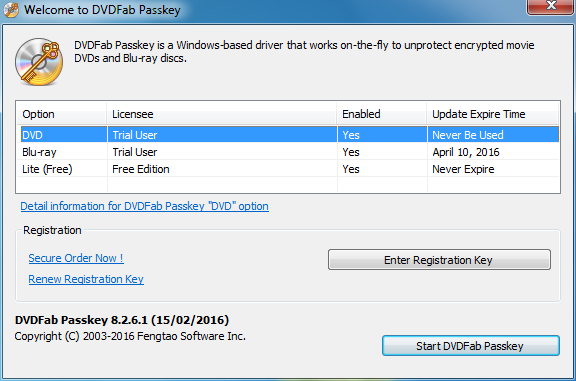
Download, install and run DVDFab Passkey for DVD/Blu-ray. Then choose the product you want to use to decrypt your DVD/Blu-ray, and click the Start DVDFab Passkey button. Immediately, it detects the source in your drive, and minimizes itsself to the system tray automatically.
 
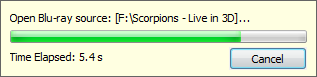
If the source has already been in the drive, DVDFab Passkey will immediately begin analyzing and decrypting it, whilst provides you the detailed progress info with its processing bar. If no, it will prompt you to load the source followed by beginning the decrypting.
 
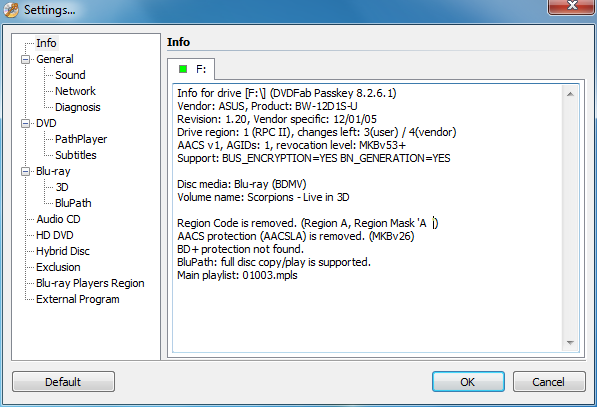
After seconds of decrypting, you will be shown with the detailed info like the general info of the drive, what kind of protections embedded are removed, and what region cod are removed, etc. on the main interface.
 
Step 2: Other operating
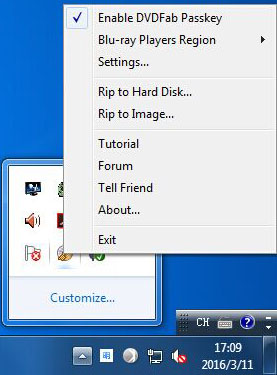
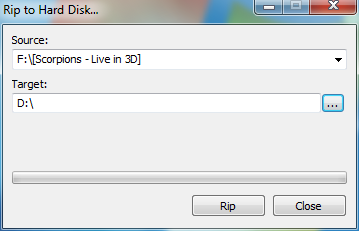
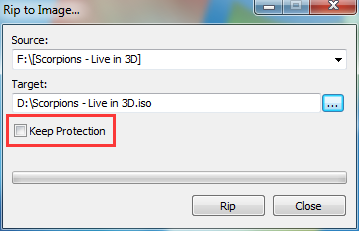
What's more considerate, DVDFab Passkey provides you the short-cuts to rip the source to hard disc or Image after decryption. To make it, you just right click the icon of Passkey in the system tray, choose the operation you need, and then select the output directory. Soon, the tasks will be done.


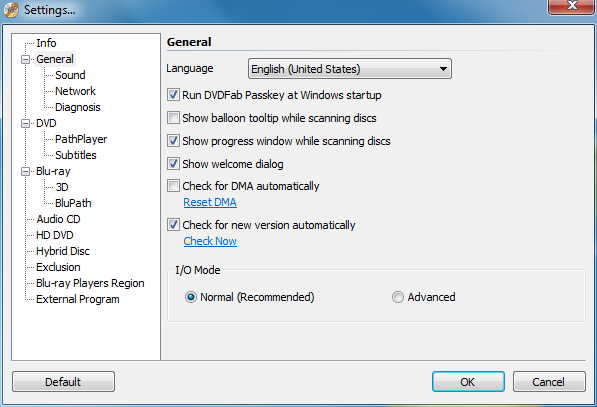
Amazing simple, right? Notice that, DVDFab Passkey provides various features to make the decryption and ripping more convenient and flexible. And you can set it yourself to make it to be the ideal status you use.

How to recover the lost WeChat contacts on iPhone SE

As an instant messenger application similar to WhatsApp, MSN, Skype, and Tencent’s own QQ, WeChat is becoming increasingly popular all over the world. Even in its native land China, the 1999 born QQ is considered lacking the power to compete with its 2011 born WeChat little brother. Now almost everybody in China who has a smart phone, no matter Android, iOS, or Windows, has a WeChat account, and it is going international day and night.
 
As so many people are communicating with WeChat, there must be a very long contact list on everyone’s WeChat. So, have you ever wondered what if one day something unexpected just happens to your smart phone, like a system update failure, or being hacked by someone, and you found some of your WeChat contacts were gone? Don’t worry, with an iOS data recovery software, this should not be a problem at all, you can get the missing WeChat contacts just by scanning your iPhone and then recovering them to your computer hard disk drive.
 
Here below in this tips, you will see the details steps to find the lost WeChat contacts from an iPhone SE.
 
Recover Lost WeChat Contacts from iPhone SE: Step 1 – Download and install the latest version of DVDFab iFoneRetore on to your computer, and then choose the first recovery mode after starting it up;
 
 
Recover Lost WeChat Contacts from iPhone SE: Step 2 – Do what the onscreen instruction asks to connect your iPhone SE to your computer via its data cable;
 
 
Recover Lost WeChat Contacts from iPhone SE: Step 3 – Click the Start button to proceed, and then click on the WeChat contacts icon from the Text Data section to start scanning your iPhone SE, which might take a couple of minutes, please wait until the scanning finishes;
 
 
Recover Lost WeChat Contacts from iPhone SE: Step 4 – When the scan finishes, you can select the wantedWeChat contacts from the list to put them back to your PC hard drive.
 
 
Sidenote: you can use the toggle switch at the top left corner to display only the deleted items to narrow down your searching scope, or use the search box at the top right corner to locate the missing WeChat contacts you are specifically looking for.
 
Above is all about how to get the deleted WeChat contacts back with iFoneRestore from DVDFab. It’s incredibly easy to do. No worry of data loss any more. For more information, you can visit http://www.dvdfab.cn/ifonerestore.htm